


Giant Jumble Crosswords
4.81.50K Reviews
App Specs
- Version
- 3.2.1
- Updated On
- License
- Free
- Downloads
- 100,000+
- Developer
- Just 2 Fun
- Categories
- Word
- Platform
- Android
Screenshots
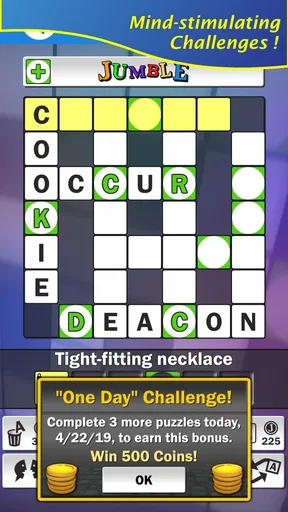
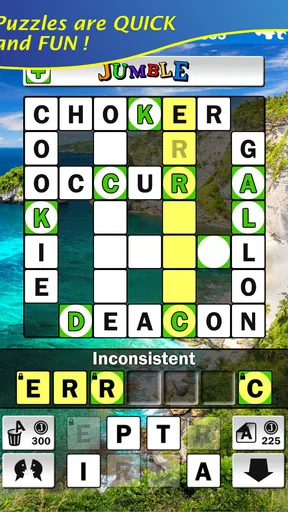
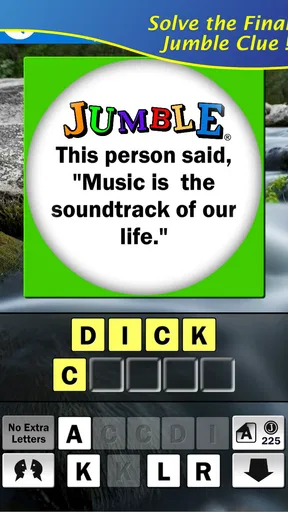
 Analysis by AppCompare
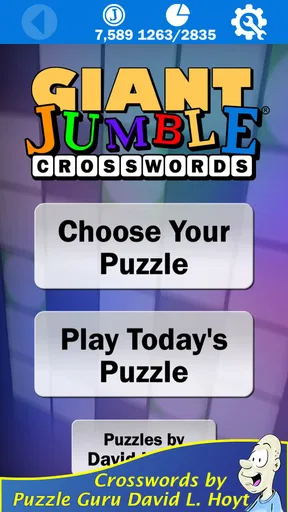
I enjoy word games most when they give me a clear challenge without turning a short break into a complicated project. Giant Jumble Crosswords fits that mood well. It is a free word game from Just 2 Fun, built around Jumble-style crossword puzzles and credited in its store description to Jumble author David L. Hoyt. After spending time with it, I found the appeal easy to understand: the basic rules are familiar, the puzzles can be started quickly, and the larger format gives the experience more presence than a tiny daily word grid.
The game has a 4.8 average from around 3,600 ratings, with more than 100,000 installs, so it has clearly found an audience beyond a handful of curious downloads. Those figures do not tell me whether every puzzle will suit every player, but they do match my overall impression: this is a focused, approachable word game rather than an overloaded collection of unrelated modes. It is free to try, rated for Everyone, and available for devices running Android 6.0 or later. Optional purchases range from $0.99 to $9.99 per item, which is worth remembering if you prefer a completely purchase-free experience.
How the puzzle format feels in everyday play
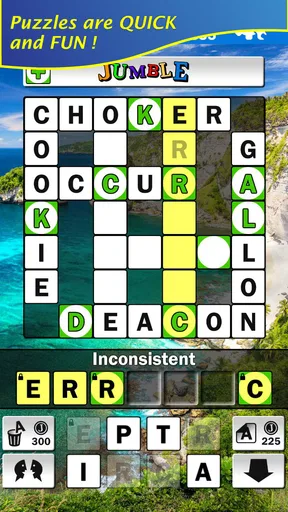
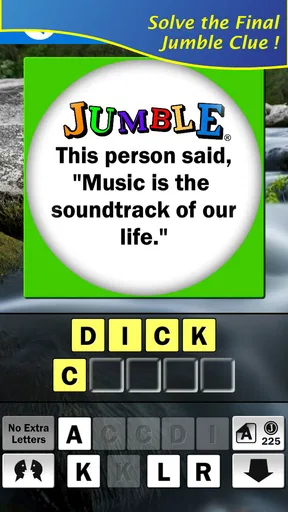
The central idea is straightforward. You work through Jumble Crossword puzzles, combining the pleasure of solving clues with the extra step of untangling scrambled letters. That combination changes the rhythm compared with a standard crossword. A clue may suggest the answer, but the letter arrangement still asks you to look at the word differently before committing to it.
I found that this makes the game feel more active than a conventional crossword app. In a regular grid, I often move from clue to clue by relying on crossings. Here, the scrambled-word element creates another small hurdle, so even familiar vocabulary can require a second look. That is especially satisfying when I recognize the answer but still need to arrange the letters correctly.
The “giant” presentation also matters. It suggests a larger puzzle experience rather than a tiny one-minute diversion, and I think that distinction will appeal to players who like settling into a word challenge. At the same time, the format is still approachable enough for a short session. I can begin with the intention of solving one section and stop without feeling that I have abandoned a complicated campaign.
The strongest reason to try it is the layered solving process: clues point you toward an answer, while the Jumble element makes you verify that answer instead of accepting the first word that comes to mind. That extra check gives the puzzles their identity.
What makes it different from ordinary crossword apps
Compared with the usual crossword alternative, Giant Jumble Crosswords feels less dependent on maintaining a long chain of crossing answers. If you enjoy traditional crosswords because of their dense interlocking structure and broad clue variety, a standard crossword app may offer more depth. If you prefer the quick satisfaction of solving words one at a time, a basic anagram game may be more direct.
Worth Reading Before You Choose

EA SPORTS FC Mobile 26 Is a Bigger Football Game, but It Takes Time

Flipboard Shows What News Apps Must Do Beyond the Feed

Switching to Android Auto Means Rethinking Your Driving Routine

Google Calendar Makes a Crowded Week Easier to Manage

Ludo King Makes the Most of the Minutes Between Plans

Baby Panda World Brings Quick Play to Modern Phones, but Its Game Library Feels Busy
This game sits between those choices. It keeps the clue-based thinking of a crossword while adding the letter-scrambling task associated with Jumble puzzles. I see that as a good fit for players who find plain anagrams too loose and full crosswords too demanding. It is also a useful change of pace for someone who normally plays daily word puzzles but wants something with a more substantial feel.
There is a trade-off, though. The format can feel repetitive if your ideal word game constantly introduces new rules, competitive events, or different puzzle types. Giant Jumble Crosswords appears most appealing when you already like its core loop. I would not choose it expecting a broad arcade-style package; I would choose it because I specifically want clue solving and scrambled words together.
Speed expectations during short sessions
From a player’s point of view, the game’s biggest speed advantage is its narrow focus. There is not a large system to learn before reaching the puzzle itself. That makes it suitable for a commute, a waiting room, or a few quiet minutes after dinner. I can get into the word-solving mindset quickly because the premise is immediately understandable.
That quick start does not mean every puzzle will move quickly. The actual pace depends on vocabulary, clue familiarity, and how comfortable you are with rearranging letters. A confident word-game player may move through easy answers briskly, while someone less familiar with a clue can spend much longer on a single entry. In that sense, the game’s perceived speed comes more from the clarity of its design than from rushing the player.
I also like that the Jumble step creates natural pauses. Instead of tapping through answers without thinking, I tend to stop, inspect the available letters, and test possible arrangements. Those pauses are part of the experience, but they can make the game feel slower than a simple word scramble when I am in a hurry.
For the best short-session workflow, I would start with the clues that immediately suggest an answer, then use those solved words to build confidence before tackling the uncertain ones. Trying to force the hardest clue first is usually less efficient. The game rewards a flexible approach: solve what you can, let your momentum grow, and return to the stubborn entry with more context.
What happens when I play for longer
Longer sessions reveal the main performance question for this kind of app: not whether the first puzzle opens quickly, but whether the experience remains comfortable after repeated solving. Word games are usually less demanding than graphically intensive games, and Giant Jumble Crosswords is built around static puzzle content rather than visually complex action. That gives me reasonable expectations for modest resource use on compatible devices.
Still, extended play can expose practical friction that a brief test misses. Repeated tapping, switching attention between clues and letter arrangements, and leaving the game paused while thinking can make a session feel more tiring than expected. The challenge is mental rather than visual, so the limiting factor for me is often concentration, not device power.
A useful way to play is to treat the larger puzzles as several small visits instead of one marathon. I might solve a group of clues, put the phone down, and return later with a fresher eye. This is more than a comfort tip: stepping away can genuinely help with an anagram because I stop forcing the same incorrect arrangement. The game works well for that stop-and-return habit, provided I remember where I was before closing it.
Players who want constant action may find these longer stretches too quiet. There is no need to react quickly, and the satisfaction comes from gradual progress. That makes it a poor match for someone seeking a reflex challenge, but a good match for anyone who wants their phone to provide a calm mental exercise rather than another source of noise.
Reliability and recovering from interruptions
My standard test for a puzzle game is simple: can I leave it during an ordinary interruption and come back without losing the thread? Word games are often played in imperfect conditions, with calls, messages, travel, and brief changes of task breaking up the session. Giant Jumble Crosswords is most useful when it fits around those interruptions instead of demanding a carefully protected block of time.
I would approach recovery sensibly. Before switching away during a difficult clue, I would note the letters or answer idea I was considering, especially if the screen is crowded with several unfinished possibilities. That small habit prevents the common problem of returning to a puzzle and forgetting which interpretation seemed promising.
There is also a difference between recovering from a mental interruption and recovering from an app interruption. If I simply lose focus, I can usually reread the clue and rebuild the pattern. If the device closes the game or the operating system removes it from memory, the experience depends on how the current state is handled. I would not treat any word game as a substitute for saving important work, so I prefer to finish or mentally mark a clue before leaving abruptly.
The game’s focused nature helps here because there are fewer systems to reconstruct than in a large role-playing or strategy title. I am returning to a puzzle, not a complicated map, inventory, or timed event. That simplicity is one of its quiet strengths, even though it may not impress players who judge games by the number of systems they contain.
Device limits and practical compatibility
The minimum operating-system requirement is Android 6.0, which keeps the game accessible to many older Android phones and tablets. That is useful for a word game because players often install this kind of title on a spare device, a family tablet, or an older phone that is no longer suited to demanding modern games.
Compatibility is not the same as identical comfort on every screen. A larger puzzle presentation may be easier to read on a tablet or a phone with a generous display, while a compact handset can make the layout feel more concentrated. I would pay particular attention to readability and tapping accuracy if I were installing it on an older or smaller device. Word games depend on seeing letters clearly; even a minor display compromise can make solving feel needlessly frustrating.
Resource demands should also be considered in context. Since the game’s appeal comes from word solving rather than detailed animation, I would expect it to be a lighter choice than a current action game. However, “light” does not mean every older device will feel equally comfortable. Available storage, background apps, battery condition, and the general health of the phone can all affect how pleasant any game feels.
For someone using a device that only just meets the operating-system requirement, I would keep other heavy apps closed before a long session and avoid judging the game during a moment when the phone is already struggling. For someone with a modern phone, the more relevant limitation is likely to be screen size and personal tolerance for the puzzle format, not raw performance.
Who will get the most from it
I would recommend Giant Jumble Crosswords to adults and families looking for an accessible word challenge that does not require fast reactions. The Everyone rating makes it broadly approachable, although individual vocabulary levels will still determine how comfortable each player feels. A child who enjoys rearranging letters may like the mechanic, while a younger player could need help with unfamiliar words or clues.
It is particularly well suited to people who already enjoy newspaper-style word puzzles, casual crossword solving, and anagrams. The game also works for a player who wants a more deliberate alternative to endless scrolling. A realistic use case would be a quiet evening when I have fifteen minutes, want to do something mentally active, and do not want to commit to a competitive multiplayer match. I can work through clues at my own pace and stop when my attention fades.
I would skip it if I wanted a strong social layer, rapid rounds, visual spectacle, or a constantly changing set of game mechanics. I would also hesitate if scrambled letters are the part of word games I find annoying rather than enjoyable. The Jumble mechanic is not a minor decoration; it shapes the whole experience. Someone who prefers pure clue solving may feel that the extra rearrangement step interrupts the flow.
Free access and the purchase question
The game is free to download, which makes trying the core experience straightforward. That is important here because the format is personal: some players will immediately enjoy the mix of clues and scrambled letters, while others will discover that the extra step is not for them.
Optional in-app purchases cost from $0.99 to $9.99 per item. I would decide in advance whether I am comfortable with optional spending, especially if the game becomes part of a daily routine. The free entry point is a genuine advantage, but players who want a strictly no-purchase environment should check their own store and device settings before handing the phone to a child.
My practical advice is to play enough free content to answer three questions: do the clues feel fair, do the letter arrangements remain enjoyable after the novelty fades, and does the larger puzzle format suit your screen? If the answer to all three is yes, the optional purchase structure may be acceptable. If not, there is little reason to spend simply because the rating is high.
My final performance verdict
Giant Jumble Crosswords succeeds because it stays committed to one recognizable idea. It is a word game from Just 2 Fun that combines crossword-style clues with the extra reasoning of scrambled answers, and that combination gives it more texture than a basic anagram app without making it as demanding as a dense traditional crossword.
In my experience, its perceived speed is best when I want a quick start and a thoughtful pace. Its resource expectations seem more suitable for ordinary Android devices than visually intensive games, while the Android 6.0 minimum keeps the door open to older hardware. The main performance concerns are practical rather than dramatic: screen comfort, concentration during long sessions, and how well I manage interruptions while working on a puzzle.
The current version is 3.2.1, and the game has been available since June 24, 2019. Those details place it as an established word-game choice rather than a brand-new experiment. I would recommend it to a friend who likes Jumble puzzles, wants a calm way to exercise vocabulary, and appreciates a game that can be played in short or medium sessions. I would point that friend toward a conventional crossword or a faster anagram game if they disliked the letter-scrambling step.
Overall, I see it as a focused, low-pressure puzzle companion. Its best quality is not speed alone, but the way it turns a familiar clue into a two-stage decision: first identify the answer, then prove it by arranging the letters. If that small extra challenge sounds satisfying, the free download is an easy way to find out whether this particular style of crossword fits your routine.
Pros
- Large collection of crossword puzzles for extended playtime.
- Simple interface makes clues and grids easy to navigate.
- Helpful hints can assist when you get stuck.
- Suitable for casual players and dedicated crossword fans.
- Progress is saved
- allowing you to return to puzzles later.
Cons
- Some puzzles may feel repetitive after extended play.
- Higher difficulty levels can be frustrating for beginners.
- Hints may reduce the challenge for experienced solvers.
- Requires patience
- especially on larger crossword grids.
- Some features may depend on ads or in-app purchases.
FAQs for Giant Jumble Crosswords
What is Giant Jumble Crosswords?
Giant Jumble Crosswords is a word puzzle game that combines the familiar challenge of solving crossword-style clues with the fun of rearranging scrambled letters. Players work through large puzzle boards, identify the correct answers, and gradually complete the grid. It is designed for casual play, but the bigger puzzles can provide a satisfying challenge for experienced word-game fans.
How does the gameplay work?
The main objective is to solve the clues and place the answers correctly in the crossword grid. You typically select a puzzle, examine the available clues, and use the scrambled letters or word options to form the required answers. As more entries are completed, crossing letters provide helpful hints for the remaining spaces, making the game easier to understand as you progress.
Is Giant Jumble Crosswords suitable for beginners?
Yes, the game is generally suitable for beginners, especially for players who enjoy word searches, anagrams, or traditional crossword puzzles. The basic controls and puzzle format are easy to learn, while the larger boards offer enough difficulty to keep regular players interested. Beginners may need time to become familiar with some clues, but the crossing letters can help guide them.
Can Giant Jumble Crosswords be played offline?
Many puzzle games allow previously downloaded content to be played without a constant internet connection, but offline availability can depend on the version of Giant Jumble Crosswords and the device being used. An internet connection may still be required for downloading puzzles, displaying advertisements, restoring purchases, or receiving updates. It is best to open the game once online before attempting offline play.
Is Giant Jumble Crosswords free to download?
Giant Jumble Crosswords may be available as a free download, although the exact pricing model can vary between Android and iOS. Free versions commonly include advertisements, optional hints, or in-app purchases that can provide extra assistance or remove ads. Before installing, check the official store listing for current pricing, permissions, supported devices, and any purchase details.


